
プロ
Super Bot Fight Mode はあなたのプロサブスクリプションに含まれています。有効にすると、製品は以下の機能を提供します:
- 既知のボットのパターンに一致するトラフィックを特定します
- ボットに挑戦したり、ブロックしたりできます
- 静的リソースの保護を提供します
- ボットトラフィックを理解するための限定的な分析を提供します
To start using Super Bot Fight Mode:
- Log in to the Cloudflare dashboard ↗ and select your account and domain.
- Go to Security > Bots.
- Click Configure Super Bot Fight Mode.
- Choose how your domain should respond to various types of traffic:
- For more details on verified bots, refer to Verified Bots.
- For more details on supported file types, refer to Static resource protection
- For more details on invisible code injection, refer to JavaScript detections.
In parts of your site where you want bot traffic, you can use the Skip action in WAF custom rules to specify where Super Bot Fight Mode should not run.
You can use the Rules language and its operators and fields in custom rules to configure a scoped rule for approved automated traffic in Super Bot Fight Mode.
If you find that Super Bot Fight Mode is causing problems with your application traffic, you may want to disable it.
To disable Super Bot Fight Mode:
- Log in to the Cloudflare dashboard ↗ and select your account and domain.
- Go to Security > Bots.
- Click Configure Super Bot Fight Mode.
- For all bot groupings (Definitely automated, Verified bots, etc.), set the value to Allow.
- For all other options (Static resource protection, JavaScript Detections), make sure the toggles are Off.
In parts of your site where you want bot traffic, you can use the Skip action in WAF custom rules to specify where Super Bot Fight Mode should not run.
You can use the Rules language and its operators and fields in custom rules to configure a scoped rule for approved automated traffic in Super Bot Fight Mode.
You can block artificial intelligence (AI) bots, crawlers, and scrapers from scraping your website content and training large language models (LLM) to recreate it without your permission. When you enable this feature via a pre-configured managed rule, Cloudflare can detect and block AI bots from your website.
This feature is available on all Cloudflare plans.
- Log in to the Cloudflare dashboard ↗ and select your account and domain.
- Go to Security > Bots.
- Select Configure Super Bot Fight Mode.
- Enable Block AI bots.
ボットレポートを使用して、過去24時間のボットトラフィックを監視します。
ボットレポートにアクセスするには、セキュリティ > ボットに移動します。自動化されたトラフィックの二桁のパーセンテージが表示された場合は、ボット管理にアップグレードして、オリジンコストを節約し、大規模な攻撃からドメインを保護することを検討してください。
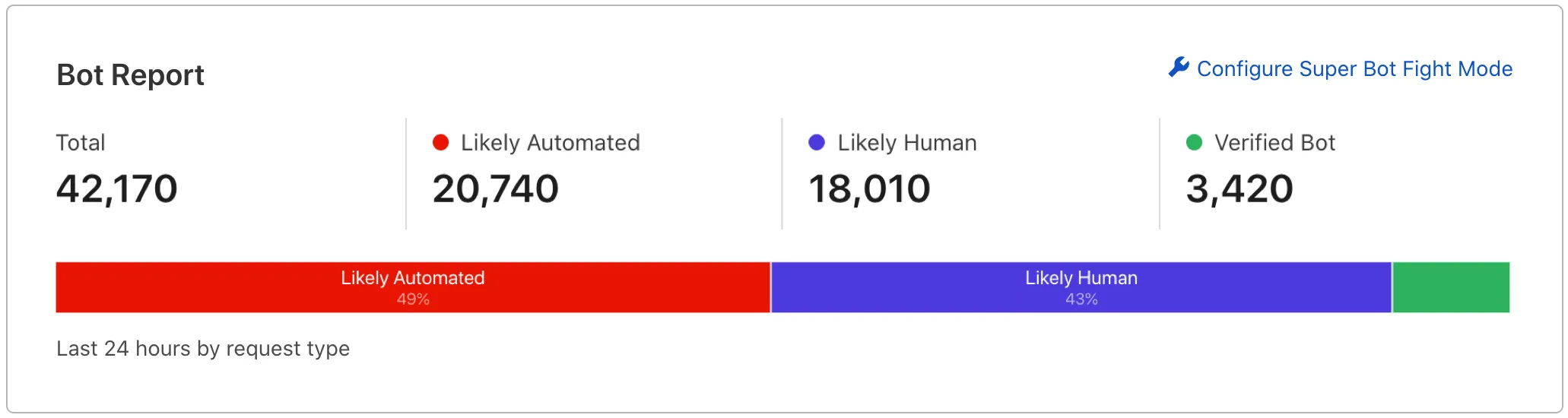
セキュリティ > イベントに移動することで、ボット関連のアクションを確認できます。この製品によって挑戦されたリクエストは、サービスフィールドにSuper Bot Fight Modeとラベル付けされます。これにより、ボットトラフィックの傾向を観察、分析、追跡することができます。
Super Bot Fight Mode runs during the http_request_sbfm phase of the Ruleset Engine.