
Cisco - Email Security (旧称 Area 1) を MX レコードとして使用する

このチュートリアルでは、Cisco IronPort を Email Security を MX レコードとして構成する方法を学びます。このチュートリアルは、いくつかのステップに分かれています。
To ensure changes made in this tutorial take effect quickly, update the Time to Live (TTL) value of the existing MX records on your domains to five minutes. Do this on all the domains you will be deploying.
Changing the TTL value instructs DNS servers on how long to cache this value before requesting an update from the responsible nameserver. You need to change the TTL value before changing your MX records to Cloudflare Email Security (formerly Area 1). This will ensure that changes take effect quickly and can also be reverted quickly if needed. If your DNS manager does not allow for a TTL of five minutes, set it to the lowest possible setting.
To check your existing TTL, open a terminal window and run the following command against your domain:
dig mx <YOUR_DOMAIN>; <<>> DiG 9.10.6 <<>> mx <YOUR_DOMAIN>;; global options: +cmd;; Got answer:;; ->>HEADER<<- opcode: QUERY, status: NOERROR, id: 39938;; flags: qr rd ra; QUERY: 1, ANSWER: 5, AUTHORITY: 0, ADDITIONAL: 1
;; OPT PSEUDOSECTION:; EDNS: version: 0, flags:; udp: 4096;; QUESTION SECTION:;domain. IN MX
;; ANSWER SECTION:<YOUR_DOMAIN>. 300 IN MX 5 mailstream-central.mxrecord.mx.<YOUR_DOMAIN>. 300 IN MX 10 mailstream-east.mxrecord.io.<YOUR_DOMAIN>. 300 IN MX 10 mailstream-west.mxrecord.io.In the above example, TTL is shown in seconds as 300 (or five minutes).
If you are using Cloudflare for DNS, you can leave the TTL setting as Auto.
Below is a list with instructions on how to edit MX records for some popular services:
- Cloudflare: Set up email records
- GoDaddy: Edit an MX Record ↗
- AWS: Creating records by using the Amazon Route 53 console ↗
- Azure: Create DNS records in a custom domain for a web app ↗
新しい送信者グループを追加するには:
-
メールポリシー > HAT 概要 に移動します。
-
送信者グループを追加 を選択します。
-
新しい送信者グループを以下のように構成します:
- 名前:
Area1。 - 順序: 既存の WHITELIST 送信者グループの上に配置します。
- コメント:
Area 1 Email Protection egress IP Addresses。 - ポリシー:
TRUSTED(デフォルトでは、このメールフローポリシーのスパム検出は無効です)。 - SBRS: 空白のままにします。
- DNS リスト: 空白のままにします。
- 接続ホスト DNS 検証: すべてのオプションを未チェックのままにします。
- 名前:
-
送信者を追加して送信 を選択し、Egress IPs に記載されている IP アドレスを追加します。
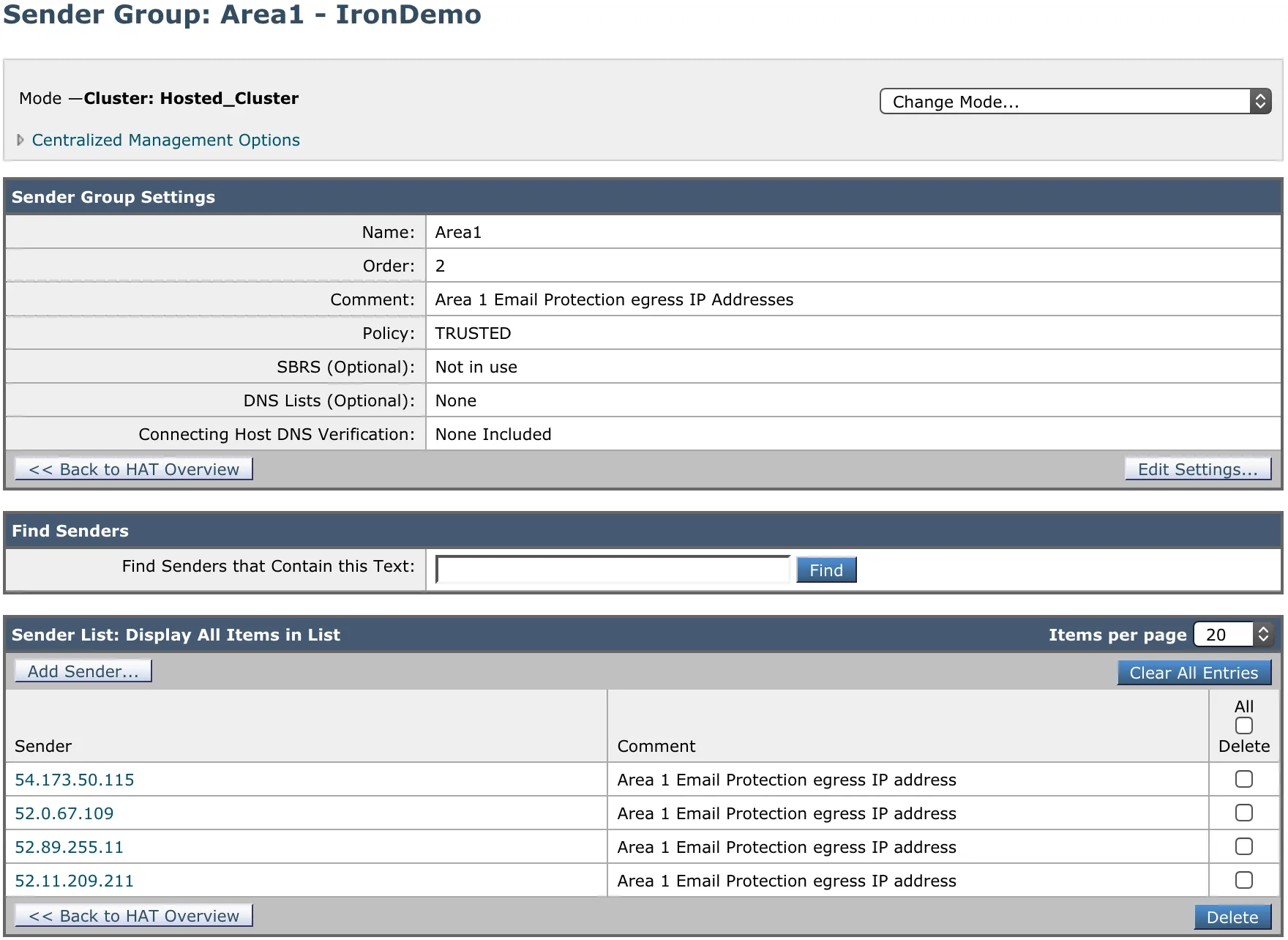
受信リレーセクションを構成して、IronPort に上流のホップを無視させる必要があります。すべての接続が現在 Email Security から来ているためです。このステップは、IronPort が元の IP を取得して IP 評判を計算できるようにするために必要です。IronPort はまた、この情報をメッセージのアンチスパム (IPAS) スコアリングに使用します。
- 受信リレー機能を有効にするには、ネットワーク > 受信リレー を選択します。
- 有効にする を選択し、変更をコミットします。
- 次に、受信リレーを追加する必要があります。ネットワーク > 受信リレー を選択します。
- リレーを追加 を選択し、リレーに名前を付けます。
- メールゲートウェイに接続して受信メッセージを中継する MTA、MX、または他のマシンの IP アドレスを入力します。IPv4 または IPv6 アドレスを使用できます。
- 元の外部送信者の IP アドレスを識別する
Received:ヘッダーを指定します。 - 変更をコミットします。
IronPort で Sender Policy Framework (SPF) チェックを無効にすることを確認してください。Email Security が MX レコードとして機能しているため、SPF チェックを無効にしないと、IronPort は SPF の失敗によりメールをブロックします。
SPF チェックを無効にする方法については、Cisco のドキュメント ↗ を参照してください。
MX レコードを更新する手順は、使用している DNS プロバイダーによって異なります。ドメインの DNS ゾーンで、現在の MX レコードを Email Security ホストに置き換える必要があります。これは、Email Security が主要な MX となるすべてのドメインで行う必要があります。例えば:
| MX Priority | Host |
|---|---|
5 | mailstream-eu1.mxrecord.io |
10 | mailstream-central.mxrecord.mx |
20 | mailstream-east.mxrecord.io |
20 | mailstream-west.mxrecord.io |
When configuring the Email Security (formerly Area 1) MX records, it is important to configure hosts with the correct MX priority. This will allow mail flows to the preferred hosts and fail over as needed.
Choose from the following Email Security MX hosts, and order them by priority. For example, if you are located outside the US and want to prioritize email processing in the EU, add mailstream-eu1.mxrecord.io as your first host, and then the US servers.
| Host | Location | Note |
|---|---|---|
mailstream-central.mxrecord.mxmailstream-east.mxrecord.iomailstream-west.mxrecord.io | US | Best option to ensure all email traffic processing happens in the US. |
mailstream-eu1.mxrecord.io | EU | Best option to ensure all email traffic processing happens in Germany, with backup to US data centers. |
mailstream-bom.mxrecord.mx | India | Best option to ensure all email traffic processing happens within India. |
mailstream-india-primary.mxrecord.mx | India | Same as mailstream-bom.mxrecord.mx, with backup to US data centers. |
mailstream-asia.mxrecord.mx | India | Best option to ensure all email traffic processing happens in India, with Australia data centers as backup. |
mailstream-syd.area1.cloudflare.net | Australia / New Zealand | Best option to ensure all email traffic processing happens within Australia. |
mailstream-australia-primary.area1.cloudflare.net | Australia / New Zealand | Best option to ensure all email traffic processing happens in Australia, with India and US data centers as backup. |
DNS の変更は、約 1 時間で主要な DNS サーバーに到達するか、前提条件セクション に記載されている TTL 値に従います。