
Cisco - CiscoをMXレコードとして使用
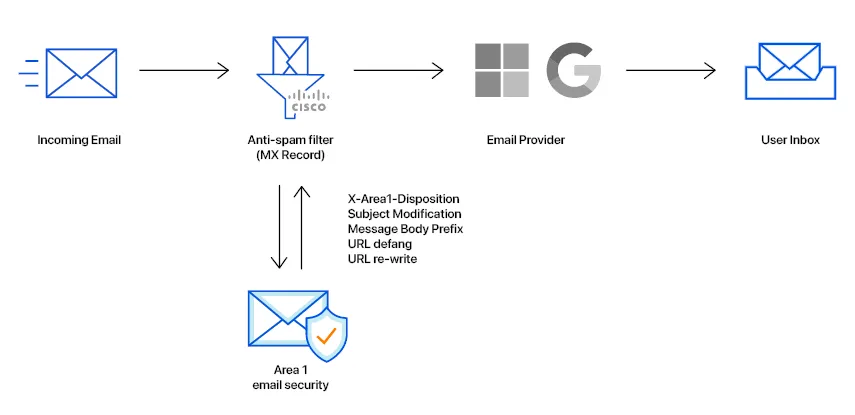
このチュートリアルでは、CiscoをMXレコードとしてEmail Securityを構成する方法を学びます。このチュートリアルは、いくつかのステップに分かれています。
新しい送信者グループを追加するには:
-
Mail Policies > HAT Overviewに移動します。
-
Add Sender Groupボタンを選択します。
-
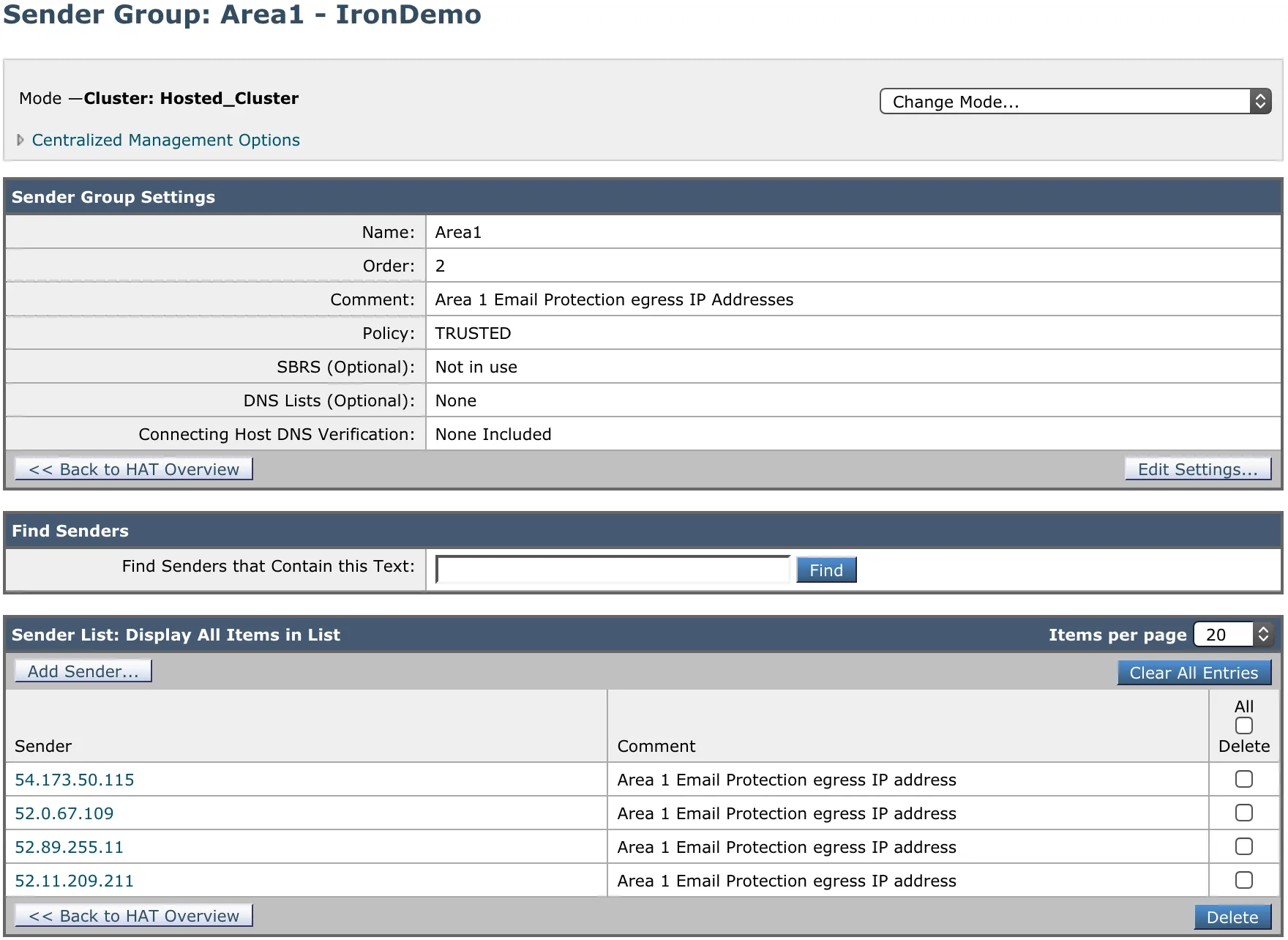
新しい送信者グループを以下のように構成します:
- Name:
Area1。 - Order: 既存のWHITELIST送信者グループの上に配置します。
- Comment:
Email Security Email Protection egress IP Addresses。 - Policy:
TRUSTED(デフォルトでは、このメールフローポリシーのスパム検出は無効です)。 - SBRS: 空白のままにします。
- DNS Lists: 空白のままにします。
- Connecting Host DNS Verification: すべてのオプションを未チェックのままにします。
- Name:
-
Submit and Add Sendersを選択し、Egress IPsに記載されているIPアドレスを追加します。EUまたはインド地域でのコンプライアンス目的でメールを処理する必要がある場合は、それらのIPアドレスも追加してください。
新しいSMTPルートを追加するには:
-
Network > SMTP Routesに移動します。
-
Add Routeを選択します。
-
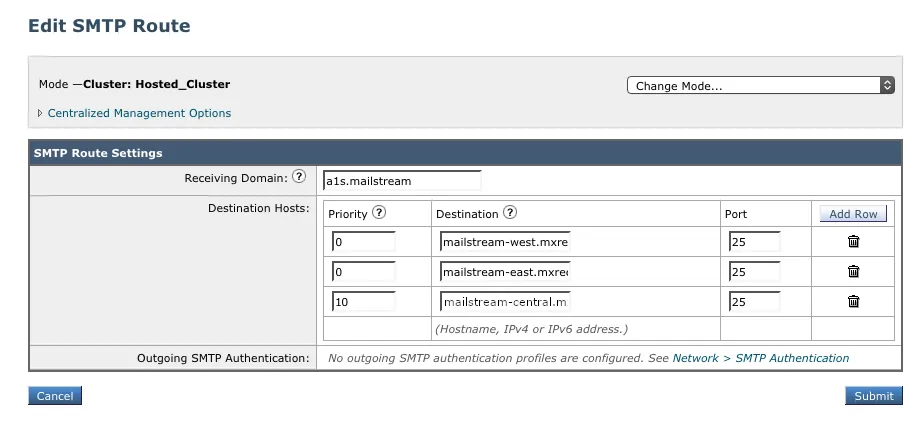
新しいSMTPルートを以下のように構成します:
- Receiving Domain:
a1s.mailstream - Destination Hostsで、Add Rowを選択し、Email Security MXホストを追加します。使用するMXホストに関する詳細は、Geographic locationsテーブルを参照してください。
- Receiving Domain:
Email SecurityとCisco ESA間のメールフローを管理するには、2つのフィルターが必要です:
- 1つは、すべての受信メッセージをEmail Securityに送信するためのもの。
- 1つは、Email Securityから戻ってくるメッセージを認識して通常の配信のためにルーティングするもの。
新しいコンテンツフィルターを作成するには:
-
Mail Policies > Incoming Content Filtersに移動します。
-
Add Filterを選択して新しいフィルターを作成します。
-
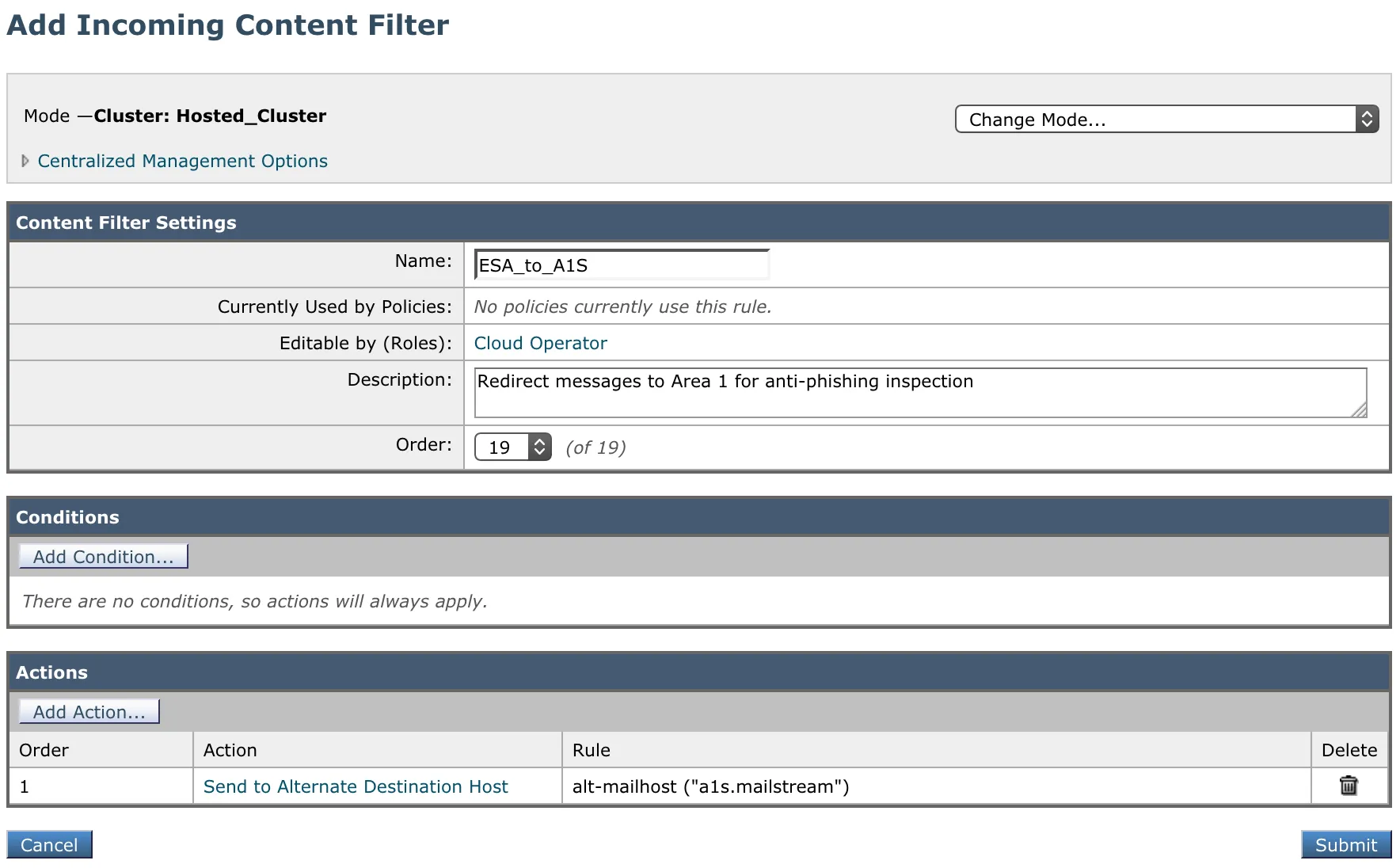
新しい受信コンテンツフィルターを以下のように構成します:
- Name:
ESA_to_A1S - Description:
Email Securityのフィッシング検査のためにメッセージをリダイレクト - Order: 他のフィルターに依存します。
- Condition: 条件はありません。
- Actions:
- ActionとしてSend to Alternate Destination Hostを選択します。
- Mail Hostに
a1s.mailstream(ステップ2で構成したSMTPルート)を入力します。
- Name:
新しいコンテンツフィルターを作成するには:
-
Mail Policies > Incoming Content Filtersに移動します。
-
Add Filterボタンを選択して新しいフィルターを作成します。
-
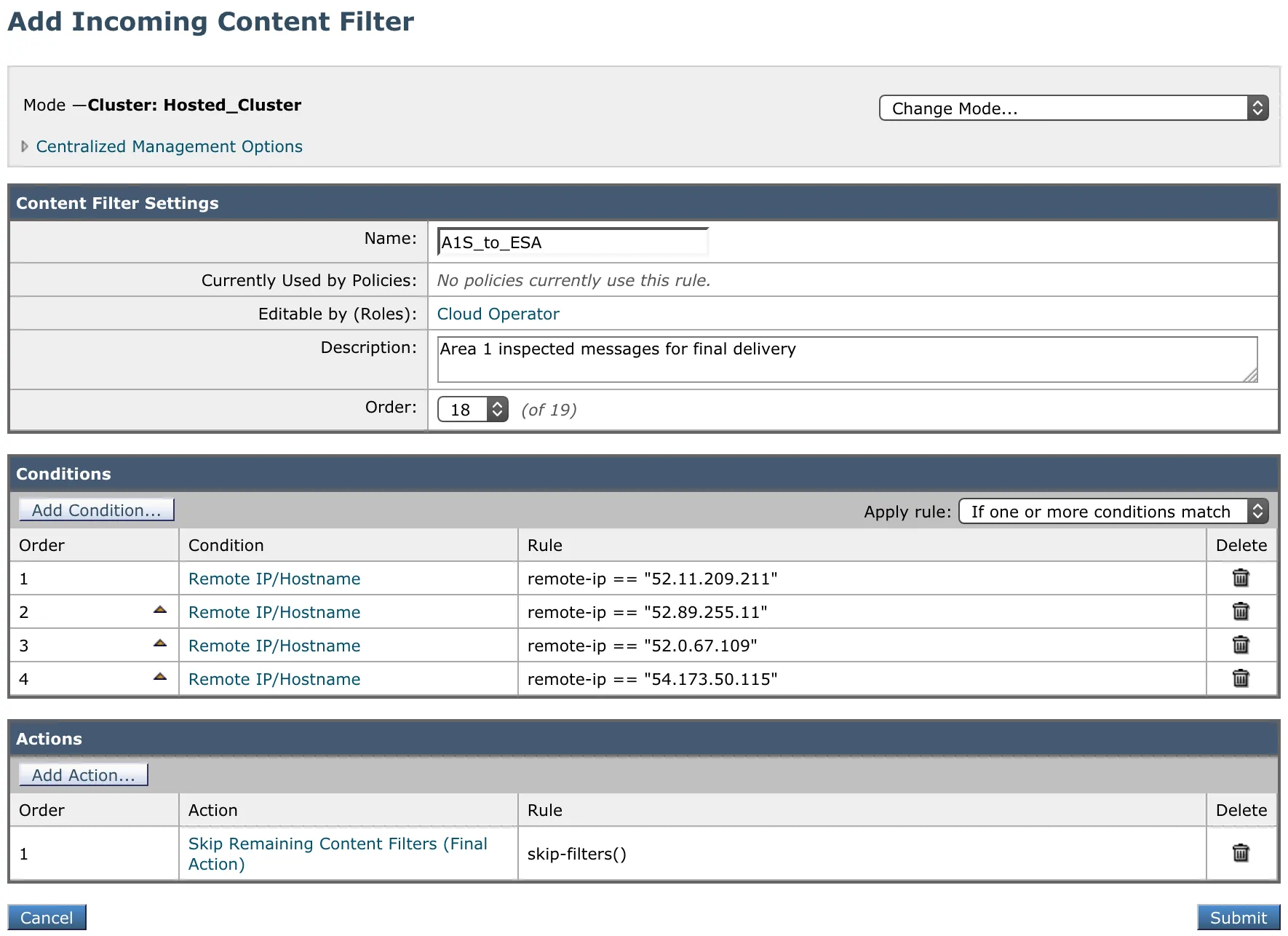
新しい受信コンテンツフィルターを以下のように構成します:
- Name:
A1S_to_ESA - Description:
Email Securityが検査したメッセージの最終配信 - Order: このフィルターは、前に作成したフィルターの前に来る必要があります。
- Conditions: Egress IPsに記載されているすべてのIPアドレスを持つRemote IP/Hostnameタイプの条件を追加します。例えば:
Order | Condition | Rule
----- | -------------------- | ---
1|Remote IP/Hostname|52.11.209.2112|Remote IP/Hostname|52.89.255.113|Remote IP/Hostname|52.0.67.1094|Remote IP/Hostname|54.173.50.1155|Remote IP/Hostname|104.30.32.0/196|Remote IP/Hostname|158.51.64.0/267|Remote IP/Hostname|158.51.65.0/26 - Apply rule: ドロップダウンがIf one or more conditions matchに設定されていることを確認します。
- Actions: Add Actionを選択し、以下を追加します:
Order | Action | Rule
--- | -------------------- | ---
1 |
Skip Remaining Content Filters (Final Action)|skip-filters()
- Name:
ステップ3で作成した受信コンテンツフィルターを、受信メールポリシーテーブルの主要なメールポリシーに割り当てます。その後、メールのリダイレクションを有効にするために変更をコミットします。
When configuring the Email Security (formerly Area 1) MX records, it is important to configure hosts with the correct MX priority. This will allow mail flows to the preferred hosts and fail over as needed.
Choose from the following Email Security MX hosts, and order them by priority. For example, if you are located outside the US and want to prioritize email processing in the EU, add mailstream-eu1.mxrecord.io as your first host, and then the US servers.
| Host | Location | Note |
|---|---|---|
mailstream-central.mxrecord.mxmailstream-east.mxrecord.iomailstream-west.mxrecord.io | US | Best option to ensure all email traffic processing happens in the US. |
mailstream-eu1.mxrecord.io | EU | Best option to ensure all email traffic processing happens in Germany, with backup to US data centers. |
mailstream-bom.mxrecord.mx | India | Best option to ensure all email traffic processing happens within India. |
mailstream-india-primary.mxrecord.mx | India | Same as mailstream-bom.mxrecord.mx, with backup to US data centers. |
mailstream-asia.mxrecord.mx | India | Best option to ensure all email traffic processing happens in India, with Australia data centers as backup. |
mailstream-syd.area1.cloudflare.net | Australia / New Zealand | Best option to ensure all email traffic processing happens within Australia. |
mailstream-australia-primary.area1.cloudflare.net | Australia / New Zealand | Best option to ensure all email traffic processing happens in Australia, with India and US data centers as backup. |