
アカウントのダッシュボードでのマネージドルールセットのデプロイ
アカウントのマネージドルールセットは、アカウントホーム > WAF > Managed rulesets でデプロイできます。
単一のゾーンに対してマネージドルールセットをデプロイするには、ゾーンのダッシュボードでマネージドルールセットをデプロイするを参照してください。
-
Cloudflareダッシュボード ↗にログインし、アカウントを選択します。
-
アカウントホーム > WAF > Managed rulesets に移動します。
-
Deploy > Deploy managed ruleset を選択します。
-
デプロイしたいマネージドルールセットの横にある Select ruleset を選択します。
-
Execution name にルールセットをデプロイするルールの名前を付けます。
-
(オプション)特定の受信リクエストのサブセットに対してマネージドルールセットを実行するには、Edit scope を選択し、現在のルールがマネージドルールセットをデプロイする範囲を決定する 式を設定します。
-
(オプション)次の方法でマネージドルールセットの動作をカスタマイズできます:
- ルール全体を設定(すべてのルールに影響)
- 特定のタグを持つ複数のルールを設定
- 単一のルールを設定
-
マネージドルールセットをすぐにデプロイするには、Deploy を選択します。デプロイする準備ができていない場合は、Save as Draft を選択します。
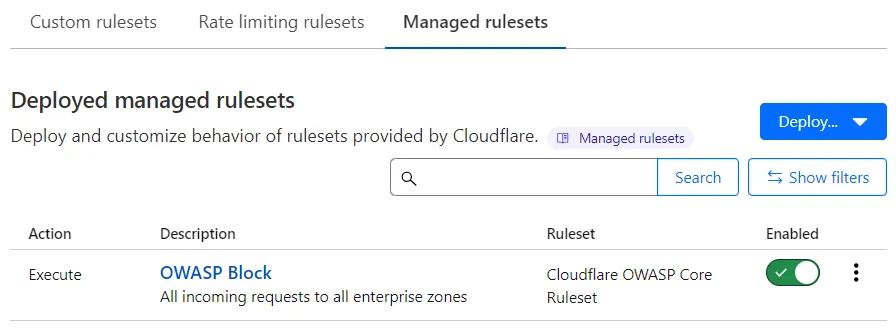
Deployed managed rulesets リストには、デプロイしたマネージドルールセットの Execute ルールが表示されます。
デプロイされたマネージドルールセットの横にある Enabled トグルを選択して、オンまたはオフにします。
マネージドルールセットを設定して、1つまたは複数のルールの特定のフィールド値を定義します(たとえば、Cloudflareによって設定されたアクションとは異なるアクションを持つルールを設定)。特定のルールをオフにすることもできます。
特定の受信リクエストに対して1つ以上のルール、または全体のWAFマネージドルールセットをスキップするには、例外を追加します。例外はスキップルールとも呼ばれ、Deployed managed rulesets リストに Skip ルールとして表示されます。
マネージドルールセット全体を設定するには:
-
Cloudflareダッシュボード ↗にログインし、アカウントを選択します。
-
アカウントホーム > WAF > Managed rulesets に移動します。
-
設定したいマネージドルールセットをデプロイする Execute ルールのルール説明を選択します。あるいは、三点リーダーを選択して Edit を選択します。
まだマネージドルールセットをデプロイしていない場合は、次の手順を実行します:
- Deploy > Deploy managed ruleset を選択します。
- デプロイして設定したいマネージドルールセットの横にある Select ruleset を選択します。
-
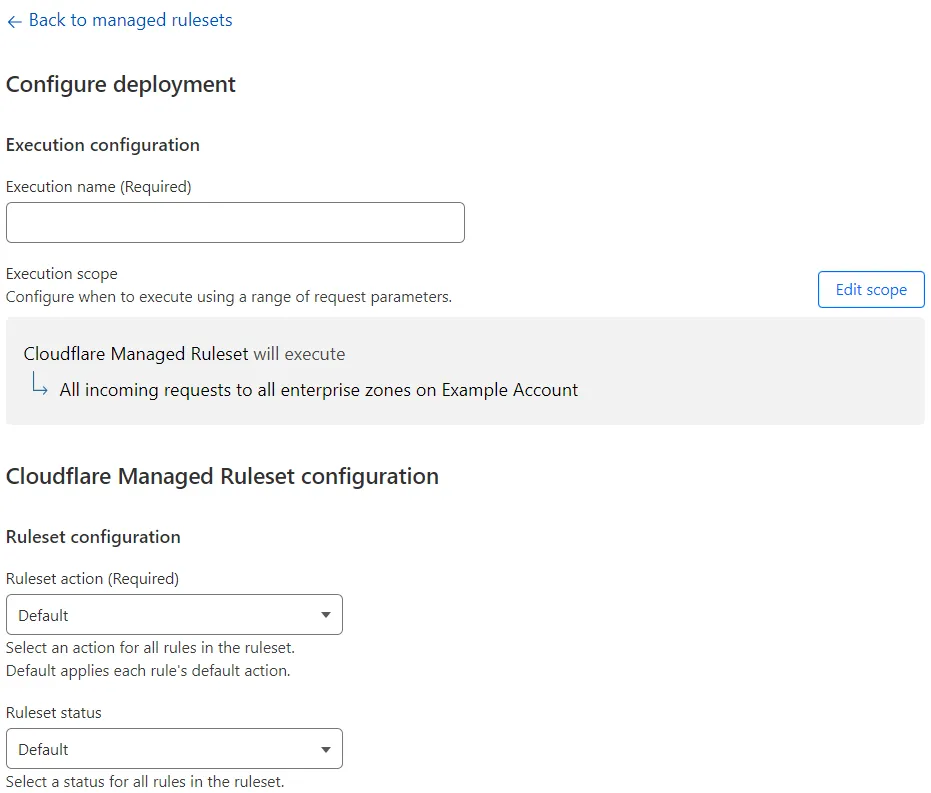
ルールセット設定セクションで、ドロップダウンリストから利用可能な値の1つ以上のルールフィールドを設定します。正確なオプションは、設定しているマネージドルールセットによって異なります。
たとえば、ルールセット内のすべてのルールに対して実行するアクションを Ruleset action ドロップダウンリストから選択します。
-
デプロイされたマネージドルールセットを編集している場合は、Save を選択します。まだマネージドルールセットをデプロイしていない場合は、Deploy を選択してルールセットをすぐにデプロイするか、Save as Draft を選択して後でデプロイ設定を保存します。
-
Log in to the Cloudflare dashboard ↗, and select your account.
-
Go to Account Home > WAF > Managed rulesets.
-
If you have already deployed the managed ruleset you want to configure, find the rule deploying that managed ruleset and select the rule description. Alternatively, select the three dots > Edit next to an Execute rule deploying the managed ruleset.
If you have not deployed the managed ruleset:
- Select Deploy > Deploy managed ruleset.
- Next to the managed ruleset, select Select ruleset.
-
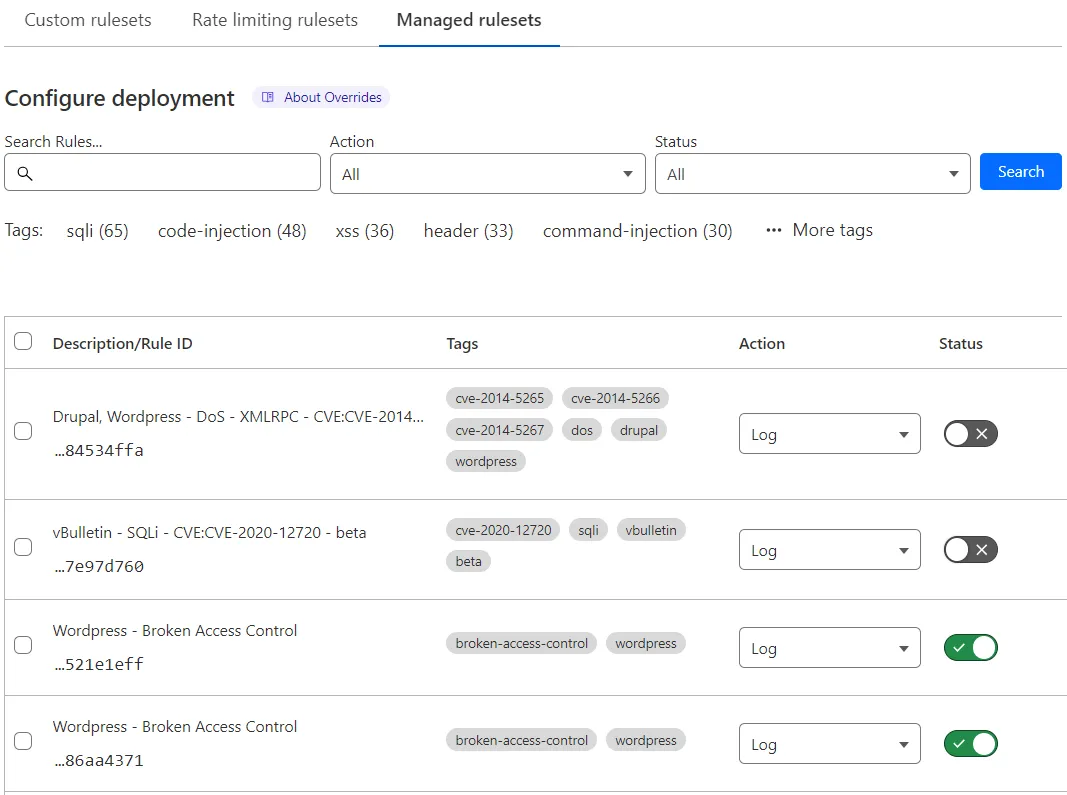
Select Browse rules.
-
Search for rules using the available filters. You can search for tags.
-
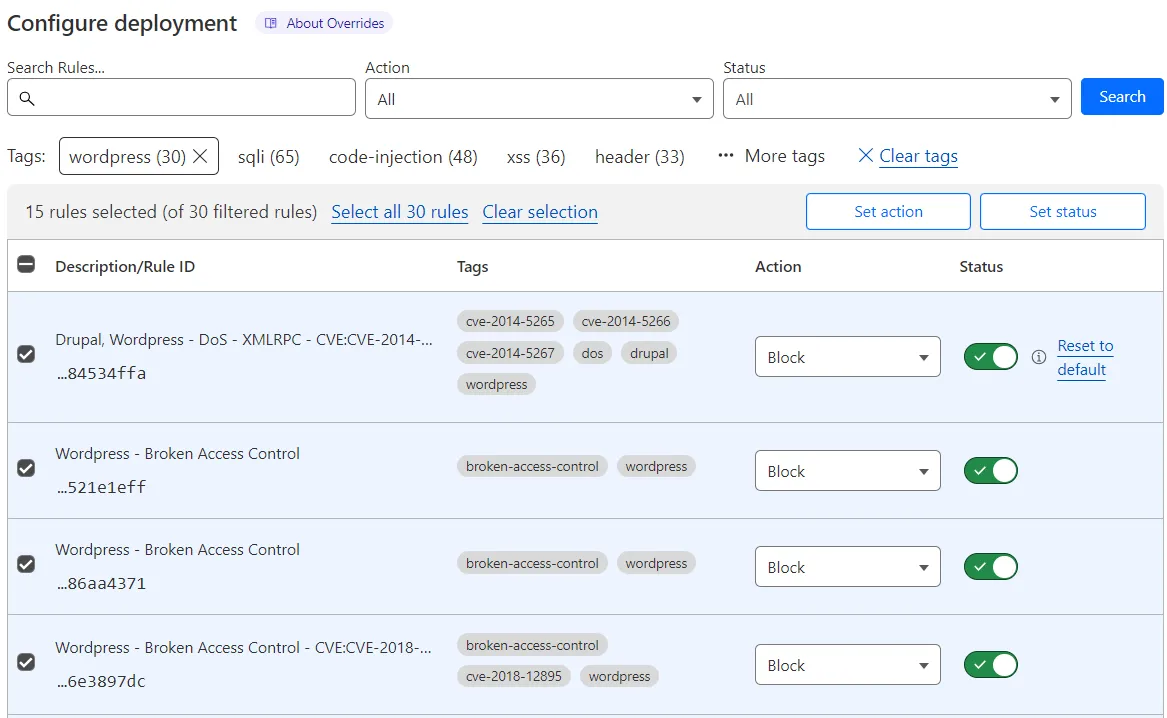
In the results list, select the checkboxes for all the rules you want to configure.
Alternatively, select a tag name under the search input to filter the rules with that tag, and then select the checkboxes for the rules you want to configure. To extend your selection to all rules with the tag across all pages, select Select all <NUMBER> rules.
-
Update one or more fields for the selected rules using the buttons displayed in the top right corner of the table.
-
Select Next.
-
If you selected a tag, a dialog appears asking you if any new rules with the selected tag should be configured with the field values you selected.
- Select Do not apply to new rules to apply your configurations to the selected rules only.
- Select Apply to new rules if you want to apply your configurations to any new rules with the select tag.
-
Select Save.
-
Log in to the Cloudflare dashboard ↗, and select your account.
-
Go to Account Home > WAF > Managed rulesets.
-
If you have already deployed the managed ruleset you want to configure, find the rule deploying that managed ruleset and select the rule description. Alternatively, select the three dots > Edit next to an Execute rule deploying the managed ruleset.
If you have not deployed the managed ruleset:
- Select Deploy > Deploy managed ruleset.
- Next to the managed ruleset, select Select ruleset.
-
Select Browse rules.
-
Search for a rule using the available filters. You can search for tags.
-
Find the rule you want to configure in the results list.
-
In the result line for the rule you want to change, select the desired value for a field in the displayed drop-down lists. For example, select the rule action in the Action dropdown. You can also change the status of a rule using the Status toggle next to the rule.
-
Select Next, and then select Save.
マネージドルールセット内の利用可能なルールをブラウズし、個々のルールやタグを検索できます。
-
Cloudflareダッシュボード ↗にログインし、アカウントを選択します。
-
アカウントホーム > WAF > Managed rulesets に移動します。
-
設定したいマネージドルールセットをデプロイする Execute ルールのルール説明を選択します。あるいは、三点リーダーを選択して Edit を選択します。
まだマネージドルールセットをデプロイしていない場合は、次の手順を実行します:
- Deploy > Deploy managed ruleset を選択します。
- ブラウズしたいマネージドルールセットの横にある Select ruleset を選択します。
-
Browse rules を選択します。
- Cloudflareダッシュボード ↗にログインし、アカウントを選択します。
- アカウントホーム > WAF > Managed rulesets に移動します。
- Deployed managed rulesets の下で削除したいルールの横にある三点リーダーを選択し、Delete を選択して操作を確認します。